State And Local Government Pixel Art Worksheet P0009
State And Local Government Pixel Art Worksheet P0009
Couldn't load pickup availability
Turn social studies review into an engaging Pixel Art Social Studies activity with State And Local Government Pixel Art Worksheet P0009, a self-checking Google Sheets activity that combines content practice, instant feedback, and a mystery picture reveal.
Students answer questions directly tied to State and Local Government while reviewing important people, places, events, vocabulary, causes, effects, ideas, and other topic-specific concepts. Each correct answer reveals another part of a hidden pixel art image, giving students a visual reward as they work.
This no-prep digital resource works well for social studies review, independent practice, formative assessment, test prep, early finishers, learning stations, homework, and sub plans. Questions are written to be grade-appropriate and focused on the featured topic.
If you are looking for a self-checking digital social studies activity that keeps students focused while reinforcing meaningful content, State And Local Government Pixel Art Worksheet P0009 makes review feel more like a puzzle than a worksheet.
🌎 Key Features
- Interactive Pixel Art Reveal — Correct answers reveal pieces of a hidden mystery picture.
- Topic-Focused Social Studies Review — Questions stay directly connected to the featured topic rather than drifting into unrelated trivia.
- Self-Checking Google Sheets — Students receive instant feedback as they work.
- No Prep Required — Assign digitally through Google Classroom or your preferred learning platform.
- Independent Practice — Students can work at their own pace with minimal teacher assistance.
- Grade-Appropriate Content — Questions are designed to match the topic and intended learning level.
🎯 Benefits for Your Classroom
✅ Boosts Engagement — Turns social studies practice into an interactive mystery picture activity.
✅ Reinforces Key Content — Helps students review important people, places, events, vocabulary, causes, effects, and ideas.
✅ Provides Instant Feedback — Students can quickly identify and correct mistakes.
✅ Supports Formative Assessment — Gives teachers an easy way to reinforce and check understanding.
✅ Saves Teacher Time — No printing and minimal grading or preparation required.
✅ Supports Independent Learning — Students work at their own pace.
📦 What’s Included
- 3 Interactive Google Sheets Pixel Art Activities
- 3 Mystery Pixel Art Images
- 60 Self-Checking Social Studies Questions
- 20 Questions Per Activity
- Answer Keys for Quick Reference
- Topic-Related Educational Snippets Connected to Each Mystery Image
❓ Sample Questions
Who makes laws for a state? — State legislature
What branch of state government includes the governor? — Executive branch
What do state courts handle? — Cases involving state laws
What is the main law of a state? — State constitution
Who votes for the governor? — Citizens of the state
What is a city's main leader called? — Mayor
What does a county government oversee? — Local services for the county
What is the group that helps the mayor? — City council
How many branches does state government have? — Three
What power does the governor have over bills? — Veto power
🧩 Puzzle Snippets
- State capitol buildings house the legislative branches of U.S. state governments, where assemblies meet to enact laws and conduct official business. Constructed mostly in the 19th and early 20th centuries, they often draw from neoclassical architecture to symbolize enduring democratic principles and state sovereignty.
- City council members gather to discuss and decide on local policies that shape community life, from budgeting to zoning regulations. Originating in early democratic systems like those in ancient Athens and formalized in modern U.S. municipalities after the 19th century, they promote inclusive governance and citizen participation at the grassroots level.
- Local government officials host town hall meetings to discuss community concerns and policies with residents. Originating in 17th-century New England as a form of direct democracy, these events promote civic participation, transparency, and local decision-making.
🛠️ How It Works
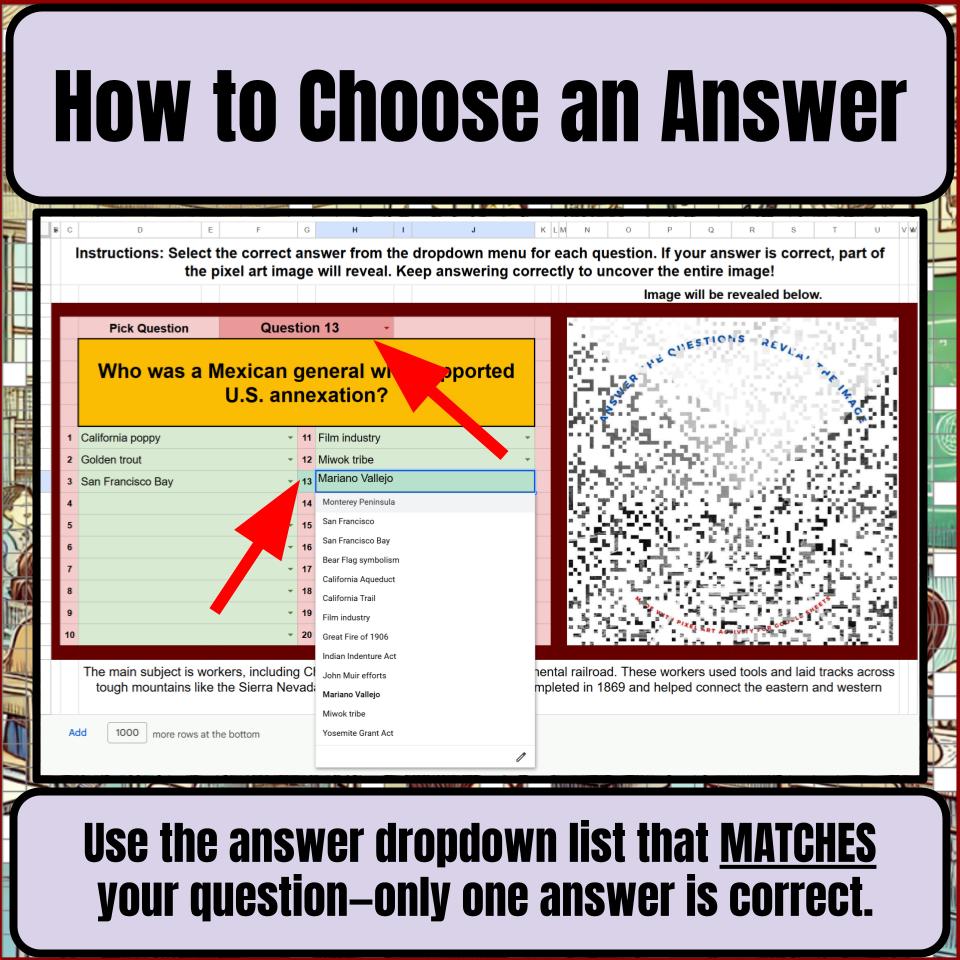
Students answer the social studies questions directly in Google Sheets. Each correct response reveals another part of the hidden pixel art image until the complete mystery picture appears.
The questions are designed to stay directly focused on the featured topic, giving students meaningful practice with relevant facts, vocabulary, people, places, events, causes, effects, and important ideas.
Answers are checked automatically, providing immediate feedback and allowing students to correct mistakes as they work.
Answer sheets are included for teacher reference. Before assigning the activity, remove the answer sheets and any visible demonstration answers from the student copy.
📥 Accessing Your Resource
After purchase, you will receive a PDF guide with step-by-step instructions and a Google Template Preview link.
Open the link and select “Use Template” to create your own master copy in Google Drive. From there, make a duplicate for student use, remove the answer sheets and any visible demonstration answers, and share through Google Classroom or your preferred learning platform.
▶️ Watch the Activity Overview
For more information about the Pixel Art activity, watch:
Created with the Pixel Art Activity for Google Sheets Add-on.
🔄 Your Purchase vs. Gamified EduTech Access
Your purchase gives you the complete Pixel Art Social Studies activities included with this resource. You can keep your Google Sheets copies and use them with your students without needing an additional subscription.
Gamified EduTech also offers separate Pixel Art subscription options:
- A Pixel Art Creator subscription for creating your own Pixel Art Google Sheets templates.
- Subject-library subscriptions for accessing collections of prebuilt Pixel Art activities by subject, including Math, Science, Social Studies, and Bible.
Subject-library subscriptions are separate. For example, a Social Studies subscription does not automatically include Math, Science, or Bible activities.
An eligible Gamified EduTech All Access subscription provides broader access across the available subject libraries.
🎟️ Gamified EduTech All Access
This resource is also available through Gamified EduTech All Access.
Already using Gamified EduTech?
Click here to view and download
Share